What Should a Singapore Social Media Kit Actually Include?
In Singapore, a branding design studio such as Logo Marketing Singapore can create a social media kit for Instagram and Facebook. Ask for platform-ready profile and cover graphics, reusable post templates and brand assets, with agreed file formats and sizes. Confirm the exact deliverables and whether editable files are included before you commit.
You want your team to keep posting on Instagram and Facebook every week without every update drifting off-brand. That consistency problem is exactly what social media kit design in Singapore is meant to solve. We design social media kits in Singapore as part of our branding services — this is our own service offering rather than an independent comparison with other Singapore providers. If your next step is deciding who should design your brand identity package in Singapore, that work usually sits with the same kind of dedicated branding team. Done well, it means your admin opens a ready template, swaps the words and images, and exports a post that still looks unmistakably like your brand.
From the team's professional design perspective, kits tend to fail in two familiar ways. Some businesses are sold every conceivable post format when they only publish a handful of recurring post types, so the folder becomes confusing and posting slows down. Others receive files nobody dares to edit, and every update quietly goes back to the designer anyway.
A practical kit is shaped around your real content rhythm — your offers, products, testimonials and announcements. It keeps a clear line between what your team can edit and what stays under professional control. It is not a bigger folder; it is a smaller, better-designed one.
In this blog, we discuss how a social media kit should be planned. We cover the templates a weekly Instagram and Facebook schedule needs. We also cover what your team should edit and what a complete handover looks like. We explain when a one-off batch is better. We flag the question of protecting your logo before you build the kit. The final section returns to that question because every template leans on that logo.
Table of Contents
How does a social media kit in Singapore match templates to your posting plan?
The most useful kits are counted in master layouts, not in resized files. A feed design supplied in a portrait version and a square version is one layout with two output formats. It is not two templates. Judge any kit by how many distinct designs it contains, and be sceptical of inflated template counts.
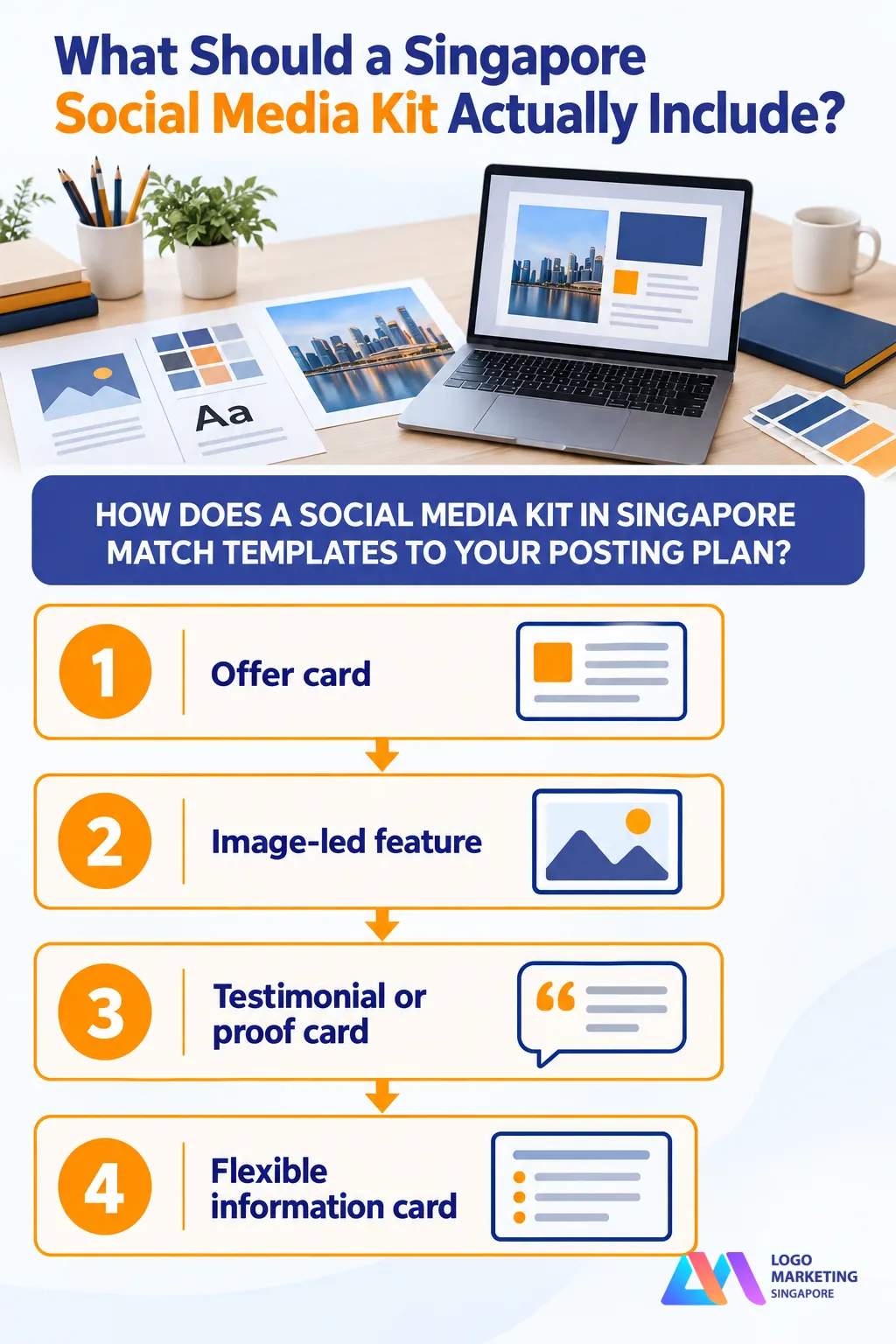
One practical starting point for a business posting three to four times a week across Instagram and Facebook is a compact set of four core layouts plus a few supporting formats. Treat this as design guidance rather than a fixed rule: the aim is to cover your repeatable content streams without creating needless choice for whoever posts.
The common mistake is commissioning separate layouts for a promotion, a hiring notice, a closure announcement and a general announcement even though all four share the same information structure. That creates extra templates, inconsistent posting and more decisions every week. Where the information hierarchy is similar, one flexible layout can deliberately serve several post types.
1. Offer card
This covers weekly promotions, price features and seasonal deals. Where you run time-sensitive offers, a vertical Story version of the same design keeps urgency posts consistent.
2. Image-led feature
This showcases a product or service with a strong photograph, a short benefit line and a simple call to action. It can be a useful repeatable layout where product or service imagery is central.
3. Testimonial or proof card
This presents customer feedback with a clear quotation area and a simple credibility line. Because quotations often run longer than promotional copy, the layout needs room for it by design.
4. Flexible information card
In our judgement, one adaptable layout can deliberately cover announcements, events, hiring notices, holiday hours and simple educational tips. The information structure stays similar — a small category label, a strong headline, brief supporting lines and one call to action — while the icon, photograph and accent colour change. This reuse is a judgement call, not a tested rule, and it avoids creating a near-identical layout for every notice.
Should Instagram and Facebook share the same template system?
They can share a core template system. As a design recommendation, use one visual system across both platforms while preparing the output variants each placement needs. What changes is the output: a portrait feed version, a square fallback for placements that crop awkwardly, and vertical artwork for Stories and Reels.
Rather than quoting pixel dimensions here, we recommend asking your designer to confirm the current sizing and safe-area requirements against the platform's own documentation at the time your kit is built. Platforms adjust crops and placements periodically, and a kit built on a screenshot from last year ages badly.
Beyond the core layouts, a carousel cover and inner pages suit step-by-step guides, frequently asked questions and multi-product content, while a simple cover design supports short vertical video. These supporting formats extend one system; they do not replace it.
Which templates should your team be able to edit themselves?
The split between editable and designer-only assets should be based on failure risk, not prestige. If an admin can replace the content without moving structural elements or judging technical production settings, the layout belongs in the editable kit. If changing an image affects masks, retouching, animation timing or legibility, it is safer kept under professional control.
If Canva is the agreed editing tool, it can suit routine posts: non-designers can use it more confidently when the structure is protected. The following is the team's risk-based design guidance.
1. Keep the structure fixed
Logo placement, outer margins, type hierarchy, colour roles and image zones should be locked or clearly protected in every editable template. These are the elements that make a post recognisably yours.
2. Leave the content fields open
Headlines, body copy, photographs, dates, prices and calls to action stay editable. That combination — fixed identity, open content — is what lets a kit stay on-brand without slowing your team down.
3. Set clear copy limits
Locking a text box does not stop someone pasting a paragraph into a space meant for a short heading. Good kits carry visible copy-length guidance in the template or its notes, so the poster knows roughly how much text fits.
4. Keep complex work designer-controlled
Photo composites, illustrated key visuals and animated templates usually stay in designer-only source formats. Edits to these can break masks, retouching or timing, so they are a poor fit for casual editing.
What should you check before accepting a social media kit handover?
Treat the inventory below as a buyer's checklist rather than a description of any single provider's package — scope and formats vary between studios, and source files are not always included. Before you pay, answer five questions. Who can edit each asset? Which files are included? What is licensed for reuse? How are the master links protected? Has the staff member who will post tested the kit?
Master protection deserves special attention. Wherever the editing platform allows it, templates should be handed over as view-only master links with clear duplicate-to-edit instructions, so nobody overwrites the original. A simple workflow is to label the master "MASTER — do not edit", open it, duplicate the file, rename the copy and only then change content. Paid fonts and stock images should stay within their licence terms rather than being casually copied into the folder.
A good handover guide may cover:
- Template selection — which layout to use for which post type
- Duplicating the master before editing anything
- Logo clear space and where the mark may not go
- Colour roles and type hierarchy
- Copy-length limits for each text area
- Image cropping and safe areas
- Carousel order and pagination
- Export settings, file naming and platform-appropriate file types
- Accessibility checks, such as text contrast
- Short examples of correct and incorrect use
When is a full reusable kit the wrong purchase?
A full kit is not always the right purchase. The following are conditional signs that a one-off batch may suit a business better; they are editorial guidance, not universal thresholds.
- You post only a few times a month, so a template system would sit idle
- No staff member will actually own content production
- You are running a short campaign whose creative will expire within weeks
- Every post needs substantial art direction, retouching or regulatory review
- A template cannot remove that production bottleneck
Then a one-off batch of finished posts may suit better. Keep editable copy only where a date or price might change. It avoids paying for a system nobody maintains. By contrast, a business publishing several times a week with recurring offers, products, testimonials and announcements may benefit from a kit.
For budget planning, see our article on how first-time Singapore retailers budget logo design. It can help you weigh this spend against other branding work. If you are comparing providers, read our guide on how to choose a logo designer in Singapore. It explains what to look for in a studio's process. You can also contact us to ask what a handover could include for your business.
Should you protect your logo before you build the kit?
Yes, if your logo is new or not yet registered. Every template in your kit leans on your logo, colours and typography, so registering the logo as a trade mark protects the assets the whole kit depends on.
According to IPOS, a trade mark application on Form TM4 costs S$280 per class. This fee applies where the specification fully adopts IPOS' Classification Database of pre-approved descriptions. Otherwise, the fee is S$410 per class. These figures appear on IPOS's current forms and fees page, checked on 18 October 2026. IPOS encourages use of its Classification Database to reduce objections and processing time.
Renewal also carries an ongoing cost — S$480 per class for renewal on or before expiry under the current schedule — so treat registration as a commitment rather than a one-off formality. Certain amendment fees also rose on 1 April 2026, which is worth knowing if your specifications may change later.
Before you build a kit around a brand-new logo, it pays to check if a logo is trademarked in Singapore. It also helps to clear your concept against existing marks. Our trade mark conflict guide covers that process in more detail. Interpreting registrability is a legal question, so speak to a qualified adviser for anything beyond a basic search.
Conclusion
Social media kits work best when the number of master layouts matches your repeatable posts. Keep the identity structure protected, while allowing approved content fields to change. A handover guide should explain how the team uses each template.
One practical starting point is a promotion card, a feature layout, a testimonial layout and a flexible information card. Add carousel or vertical variants only where your content needs them. This is design guidance, not a proven formula.
At Logo Marketing Singapore, we offer social media kit design as part of our branding services. This is the studio's own service offering, not an independent comparison with other Singapore providers.
If you want a kit your team can use, get in touch and tell us what you post each week. We can discuss a kit built around your real content rhythm.
Ready for a kit your team can actually run with?
Tell us what you post each week, and we can discuss core layouts, editable assets and a practical handover for your admin.